Facebook Twitter Instagram
    Teardrop Builder
    • Build Journal
      • Planning and Design
      • Trailer Assembly
      • Building the Deck
      • Sealing the Deck
      • Sidewall Templates
      • Building the Walls
      • Building Cabinets
      • Walls and Cabinets to Deck
      • Insulation and Headliner
      • Roof Spars and Blocking
      • Building the Hatch
      • Wiring and Insulation
      • Gluing Outer Skins
      • Dying
      • Epoxy
      • Varnish
      • Finishing Cabinets
      • Toungebox
      • Trim and Final Details
      • Completed Pictures
    • Plans
      • Wyoming Woody Teardrop Plans
      • Wyoming Woody Teardrop SketchUp Model
      • Wyoming Woody Profile
      • Northern Tool Trailer SketchUp Model
      • Wyoming Woody Parts List and Cost Breakdown
      • Wyoming Woody Teardrop CNC files
    • Components
      • Vintage Technologies
      • Li’l Bear Tagalongs
      • superbrightleds.com
      • rvvent.com
      • Jamestown Distributors
      • McMaster-Carr
      • Hobby King
      • The Foam Factory
      • Northern Tool
      • etrailer.com
      • Woodcraft
    • Builder Resources
      • tnttt.com
      • Tear Jerkers
      • Teardrop Trailers Reddit
      • Little Swiss Teardrop
      • Camping Classics
    • Commercial Teardrops
      • Camp Inn
      • Little Guy Trailers
      • TC Teardrops
    • About
    Teardrop Builder

    Planning and Design

    0
    By Ryan on December 19, 2012 Build Journal

    The design phase is one of the most fun and important parts of the teardrop build process. For the design I gathered hundreds of ideas from other teardrop builds and even other types of projects, such as wooden Chris Craft boats I emulated to get the final finish on the exterior. A great place for getting more ideas is the Teardrop and Tiny Travel Trailer forum at tnttt.com. Here there are literally hundreds of ongoing and past teardrop builds with pictures and a friendly and helpful community where you can ask questions.

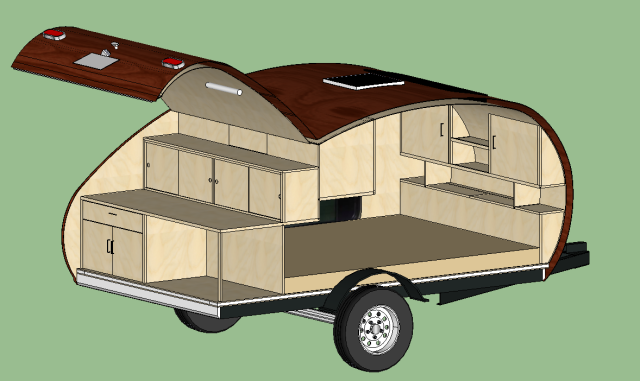
    To come up with the final design I used a great 3D modeling software program called SketchUp which you can download for free. SketchUp allowed me to play with different ideas and designs, and quickly see if there are any problems with spacing or placement right away.  Doing this type of design up front took more time but in the end saved far more time and money by discovering problems before I even took a saw to the first piece of wood.

    My build journal on this website has been designed to be a step-by-step guide to document my teardrop build process. With this build journal used in conjunction with my detailed plans and SketchUp model linked to below, you should have the tools to recreate it or cherry pick from the design and technical details to design your own teardrop creation.

    For the full set of final architectural plans, including detailed measurements of all components, you can download them here: Wyoming Woody Teardrop Plans

    The final 3D SketchUp model of the teardrop can be downloaded here: Wyoming Woody SketchUp Model

    If you want to reuse the side profile you can find that here: Wyoming Woody Profile Measurements
    New Design 5

    1 2 3
    Share. Facebook Twitter Pinterest LinkedIn Tumblr Email
    Ryan

    Related Posts

    Wyoming Woody Teardrop Completed Pictures

    Finishing the Cabinets

    Finishing with Spar Varnish

    Comments are closed.

    Most Commented
    September 19, 2013

    Installing Components and Final Details

    September 11, 2013

    Building the Galley Hatch

    September 20, 2013

    Wyoming Woody Teardrop Completed Pictures

    September 15, 2013

    Applying the Epoxy

    December 19, 2012

    Building the Deck

    Recent Comments
    • The Top Teardrop Trailer Plans - Tiny House Huge Ideas on Wyoming Woody Teardrop Plans
    • Can You Really Build Your Own Teardrop Camper from a Kit? on Wyoming Woody Teardrop Plans
    • Jonesy on Building the Deck
    • Yannick Autphenne on Building the Deck
    • Rob Reynolds on Applying the Epoxy
    © 2026 TeeardropBuilder Designed by ThemeSphere.

    Type above and press Enter to search. Press Esc to cancel.